What are impressions on LinkedIn? (and what they can't prove)
 Axel Schapmann7 min read
On this page
What an impression on LinkedIn means
LinkedIn defines an impression as the number of times your post was displayed on screen (Combined post analytics). One display, one impression. The person may have scrolled straight past it, read every line, or looked away: it counts the same.
Three details most explanations leave out, all from LinkedIn Help:
- Your own views count. LinkedIn counts your own views, engagements, saves and sends in your post analytics (View post analytics). Refreshing your post to check it adds to its impressions.
- The number is an estimate. LinkedIn writes that "the numbers in your post analytics are estimates and may not be precise" (Post analytics for your content).
- It's split by network. Next to impressions you see the share that came from people who follow you or are connected to you (in network) and from everyone else (out of network).
To find them, click Me > Posts & Activity, then [number] impressions under any post. For all your posts over time, open your profile, go to Analytics > Show all analytics and click Post impressions. You can pick a range from 7 to 365 days and export it.
Impressions vs members reached
Members reached is the number of distinct members and Pages that saw your post, without repeats. Impressions count every display, so they're always equal to or higher than members reached: someone who sees your post in their feed on Monday and again on Tuesday is one member reached and two impressions.
LinkedIn keeps impression counts for 1,000 days but members reached for only 400, so posts older than about 13 months show impressions without members reached.
If you track one of the two, members reached is closer to "how many people", though it's still an estimate.
Impressions vs views
An impression means the post was displayed. A view implies someone actually watched or opened something:
- Video views: on LinkedIn Pages, a video view is counted after more than 2 seconds of watch time (Content analytics).
- Article views: the number of times your article was seen on LinkedIn or through email, a separate metric from impressions.
For text and image posts, the number under your post is impressions, even though most people call it "views". LinkedIn Help labels it impressions in post analytics.
What LinkedIn doesn't let you check
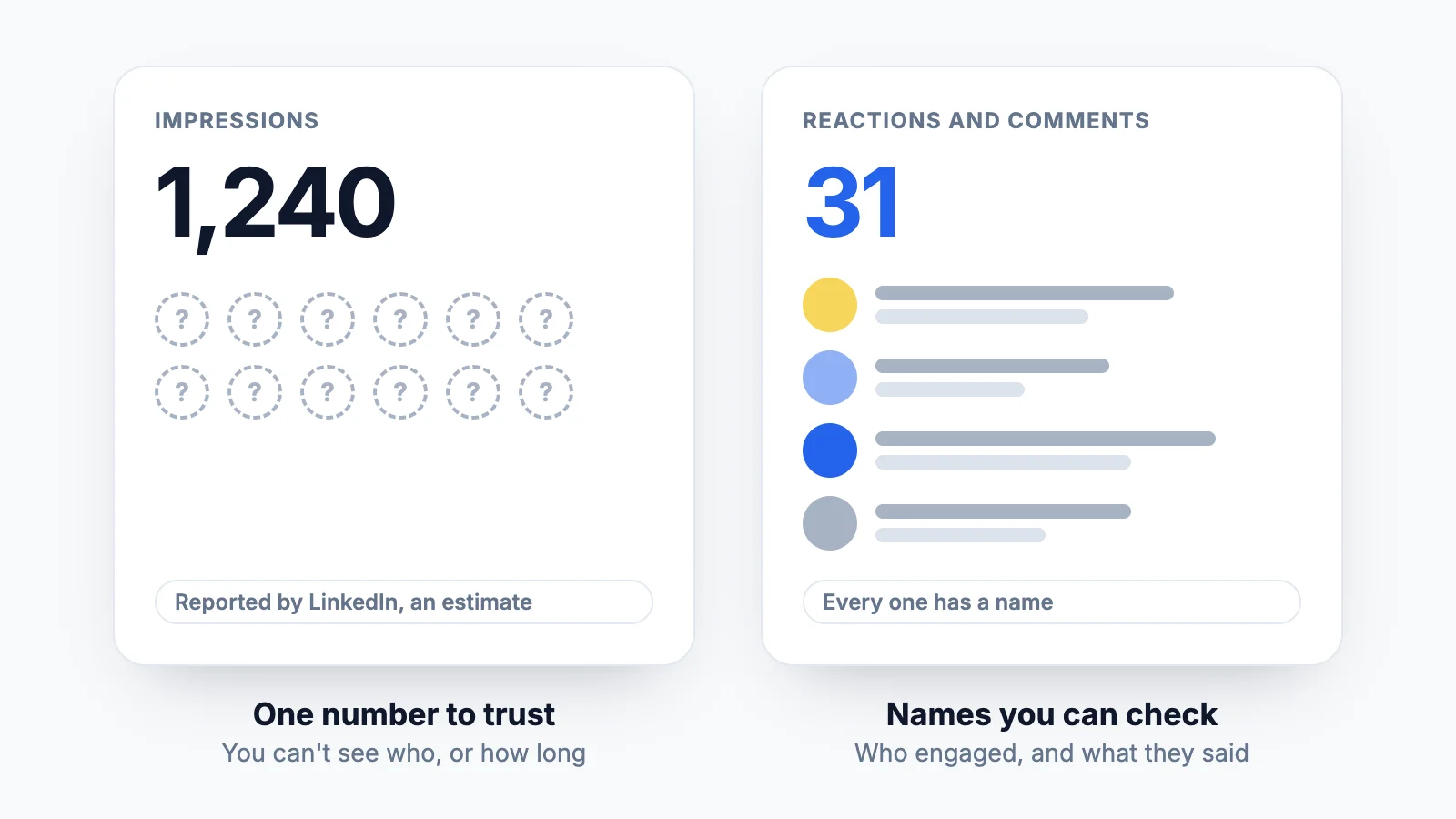
Impressions are a number only LinkedIn can count. You can't see who the impressions were, whether they were real people or the same person twice, or how long anyone looked. LinkedIn decides what counts as a display, calls the result an estimate, and says it keeps "evaluating, and in some cases adjusting, how we show analytics".
It even adds noise on purpose. To protect viewers' anonymity, LinkedIn introduced "a small amount of noise" to its audience demographics and says that because of these privacy protections "numbers may not be precise" (Recent changes to viewers demographics).
That doesn't make impressions fake. They still move with reality: in our data, posts with more impressions get more engagement (a correlation of about 0.8 on a log scale). But they're a reported number, not an observed one.
Engagement is different. Every reaction and comment comes with a name you can click. You can read the comments, see who reacted, and tell a prospect from a bot. That's the number you can verify.
What is a good number of impressions on LinkedIn?
We looked at 41,788 LinkedIn posts published by 866 people over the last 12 months (September 2025 to September 2026). They were synced by MyFeedIn users from their own accounts, with the impressions LinkedIn reports to each author, counted once each. It's a sample of people active enough on LinkedIn to use an analytics tool, not all of LinkedIn, but it's real data rather than a guess.
| Impressions on a post | Where it lands |
|---|---|
| 200 | Bottom quarter: 25% of posts get fewer |
| 508 | The median: half of posts get fewer |
| 1,000 | Better than about two thirds of posts (68%) |
| 1,386 | Top quarter starts here |
| 4,105 | Top 10% |
| 5,000 | Better than 92% of posts |
| 10,000 | Better than 96% of posts |
| 20,000 | Better than 98% of posts |
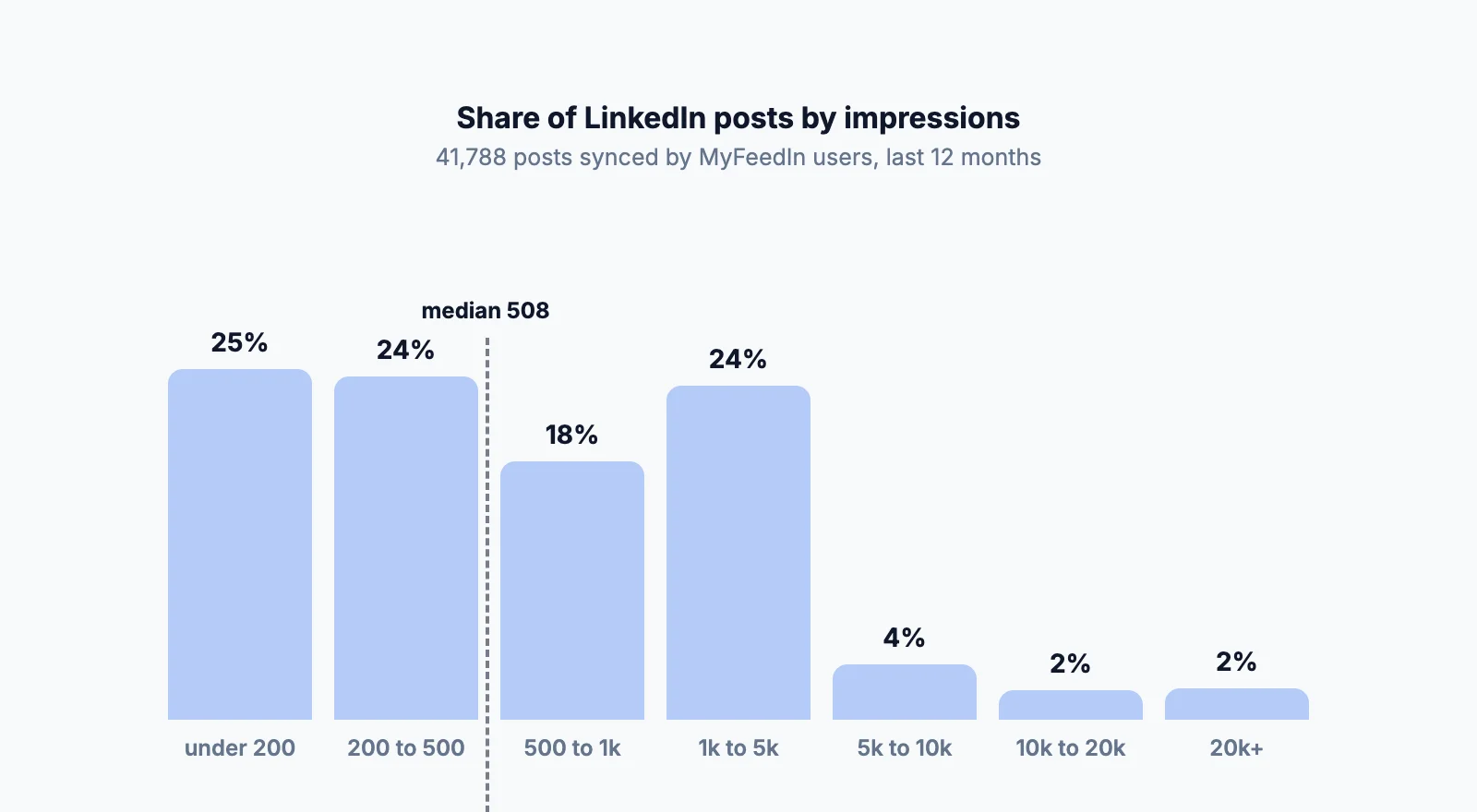
So 200 impressions is a slow start but common, 500 is a normal post, 1,000 is a good one, and anything above 5,000 is rare. Your own numbers depend mostly on your network's size and how active it is, so compare yourself with your own last 20 posts before anyone else's. For how formats compare on the same data, see the best LinkedIn post format.
Why more impressions often means a lower engagement rate
In the same dataset, the typical post gets 11 reactions and 2 comments, for a median engagement rate of 2.31% (reactions, comments and reposts divided by impressions; the middle half of posts sit between 1.06% and 4.18%).
But the rate drops as impressions climb:
| Impressions | Median engagement rate |
|---|---|
| Under 500 | 2.46% |
| 500 to 2,000 | 2.73% |
| 2,000 to 10,000 | 1.69% |
| 10,000 and more | 0.64% |
Once a post leaves your network, LinkedIn shows it to people who don't know you and mostly scroll past. The impression count grows much faster than the number of people who care. And about 1 in 5 posts with 1,000+ impressions got 2 comments or fewer (19.9%).
A big impression number tells you the post travelled. It doesn't tell you anyone paid attention.
Judge a post by the engagement you can see
Use impressions as context, and make decisions on what you can verify:
- Engagement rate. Reactions + comments + reposts, divided by impressions. Above roughly 2.3% you're doing better than the typical post in our data. Our LinkedIn engagement rate calculator does the math.
- Comments, read one by one. Two thoughtful comments from people in your market beat forty "great post". In our data, the median is 2.7 comments per 1,000 impressions.
- Who engaged. Open the list of reactions. Are they peers, prospects, recruiters, or the same five friends? That's the audience your post actually reached.
- The trend across posts. One post's impressions tell you little. Your last 20 or 30, side by side, show which topics and formats hold attention.
LinkedIn's native analytics show these per post and make the pattern hard to see. MyFeedIn's LinkedIn analytics keep your full post history in one place, with engagement rate, the comments you received and who engages most, so you judge your content on what you can check.
Beyond one post: results you can count yourself
Engagement tells you a post landed. These tell you LinkedIn is doing something for you, and every one of them is visible to you, not reported by LinkedIn:
- Connection requests from your target audience. Note which post or comment each one came from.
- Messages that turn into real conversations. Count the ones that go past a first reply, and which lead to a call.
- Actions off LinkedIn. Newsletter signups, site visits or meetings booked through a link you can track.
How to get more impressions
Impressions follow engagement, so the levers are the same ones that earn reactions and comments (we tested the common rules on 40,000 posts in how the LinkedIn algorithm works):
- Post when your audience is on LinkedIn, so the first people who see it are there to respond. Here's the best time to post on LinkedIn.
- Open with a line worth stopping for. Only the first lines show before "...more", and that's where people decide to keep reading.
- Answer every comment. Each reply is another reason for people to come back to the thread.
- Pick the format for the idea. Formats reach differently: compare them in our post format data.
- Comment on other people's posts before and after you publish: it's the fastest way to put your name in front of people who don't follow you yet.
If a post barely got seen at all, start with why your LinkedIn post got no views.
FAQ
What does 1,000 impressions mean on LinkedIn?
Your post was displayed on LinkedIn about 1,000 times, not necessarily to 1,000 people, since one person can see it more than once and your own views count. In our data of 41,788 posts, 1,000 impressions beats about two thirds of posts.
Is 500 impressions good on LinkedIn?
It's the typical result: the median post in our dataset gets 508 impressions. Whether it's good depends on what happened next. 500 impressions with 15 reactions and a few real comments is a better post than 5,000 impressions and silence.
Do my own views count as impressions on LinkedIn?
Yes. LinkedIn Help states that your own views, engagements, saves and sends are counted in your post analytics. Checking your post ten times adds to its impressions.
Are LinkedIn impressions accurate?
LinkedIn says the numbers in post analytics are estimates and may not be precise, and it adds deliberate noise to some audience statistics to protect viewers' privacy. The count comes only from LinkedIn and you can't see who the impressions were, so treat it as a trend, not an exact figure.
What is the difference between impressions and members reached on LinkedIn?
Impressions count every time your post was displayed. Members reached counts the distinct members and Pages that saw it at least once, without repeats. Impressions are always equal to or higher than members reached.
What is the difference between impressions and views on LinkedIn?
An impression means your post was displayed. A video view means someone watched it: on LinkedIn Pages, a video view is counted after more than 2 seconds of watch time. Articles have their own views metric, which also counts reads from email.