Why is my LinkedIn feed full of irrelevant posts?
 Axel Schapmann6 min read
On this page
What's actually in your LinkedIn feed
Your default feed was never just the people you chose. According to LinkedIn Help, it mixes:
- posts, shares, comments and reactions from your network,
- updates from companies and interests you follow,
- recommended content from people you've never heard of,
- sponsored content.
All of it is then ranked by what LinkedIn thinks you'll engage with. So "irrelevant" usually comes from one of five sources, and each has its own fix.
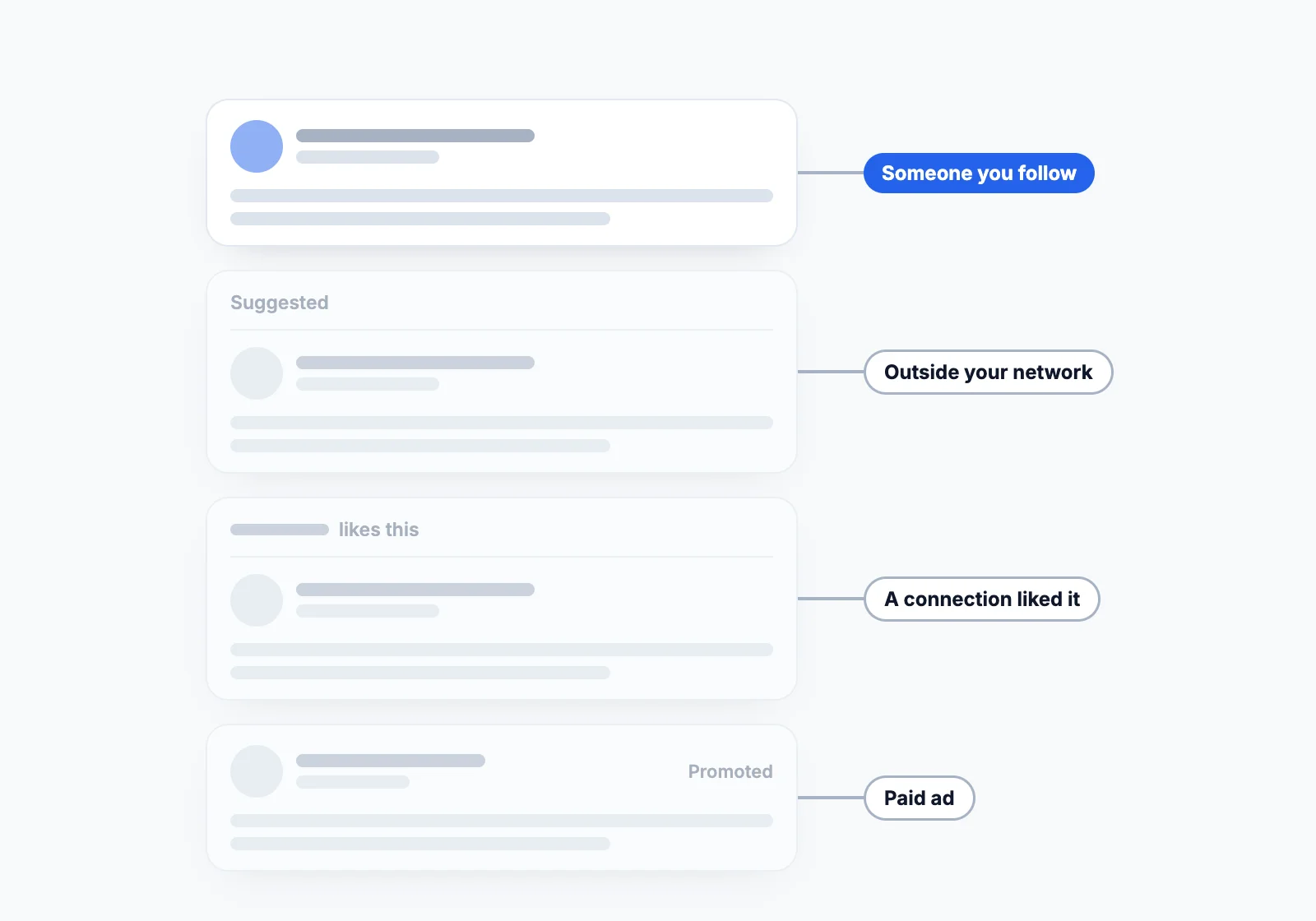
1. Suggested posts from outside your network
Posts with a Suggested header come from people outside your network. LinkedIn explains that it first builds a pool of content it rates as high-quality and professionally relevant, meaning not too promotional and useful beyond the author's own network, then picks from that pool for you using:
- your past interactions: comments, reactions and time spent on posts,
- your profile: job title, location, industry,
- how likely you are to engage with the post.
That's why suggested posts often look relevant to your job title rather than to you. A marketing manager gets marketing takes, whether or not they care about them.
LinkedIn is betting on this format: its engineering team told Entrepreneur it wants the most useful posts shown to interested readers for months. Expect more suggested posts, not fewer. To remove one, click the X at its top right: LinkedIn says that post won't appear in your feed again.
2. Posts your connections liked or commented on
The "[Name] likes this" and "[Name] commented on this" posts come from LinkedIn's visibility rules. A post set to Anyone can appear in the feed of 2nd and 3rd-degree connections when a 1st-degree connection reshares it, comments on it or likes it.
So one connection who reacts to everything can fill your feed with strangers. If that's the pattern, unfollow that connection: you stay connected, they aren't notified, and their activity stops reaching you. More in does unfollowing someone on LinkedIn notify them.
3. The feed learns from everything you do
LinkedIn tracks your social actions, meaning the posts and articles you write, what you like and what you comment on, including inside LinkedIn Groups, and feeds them into its ranking. Time spent on a post counts too.
It can't tell interest from curiosity or annoyance. Liking a friend's post to be polite, stopping on a viral story, or reading a hot take you disagree with all look like "more of this, please". A few weeks of that and your feed drifts toward content you never wanted.
4. You follow everyone you connect with
When someone becomes a 1st-degree connection, you automatically follow them. Accept 800 invitations and you follow 800 people, including the former colleague who posts motivational quotes and the recruiter sharing generic career tips.
LinkedIn has no way to know which of them you actually want to read until you tell it, by unfollowing the rest or by engaging with the ones that matter.
5. Sponsored posts and Company Pages
Posts labeled Promoted are ads. Your feed settings don't touch them: LinkedIn says changing your feed view doesn't affect ads, and your advertising preferences only change how they're targeted. Company Pages you followed once, often during a job search, keep posting their marketing into your feed until you unfollow them.
Why am I seeing old posts on LinkedIn?
Because LinkedIn tested it. In mid-June 2025, LinkedIn rolled out a change that pushed posts from two or three weeks earlier to the top of feeds. Its VP of product management told Business Insider the goal was to find how recent content needs to be to stay relevant. Another LinkedIn manager later explained the idea was to make sure people who don't log in for weeks still see updates like job changes in their network. After a wave of complaints, LinkedIn said the shift was temporary and rolled it back.
Even without a test, the default Top feed ranks by relevance, not by date, so a popular post from last week can beat one from an hour ago. If you want the newest posts first, click Sort by above your feed and pick Recent (desktop only), or make it permanent in Preferred Feed View.
How to fix each cause
| Cause | Fix |
|---|---|
| Suggested posts | Switch to Most recent posts, or click the X on each one |
| Strangers your connections liked | Unfollow the connections whose activity you don't want |
| A feed trained on the wrong signals | Not interested on bad posts, real comments on good ones |
| Following every connection | Clean your list in My Network > Following & followers |
| Company Pages | Unfollow the Pages you no longer read |
| Old posts | Sort by: Recent, or Most recent in Preferred Feed View |
| Ads | Can't be removed with feed settings |
The full step-by-step, with the settings paths and a 7-day plan, is in how to reset your LinkedIn feed.
A feed of only the people you picked
Every fix above is a way of telling LinkedIn who you actually want to read, one click at a time, while it keeps testing new content on you.
MyFeedIn's creator feeds start from the other end: you pick the people, group them into feeds by topic or goal, and see only their posts in the order they were published. No suggested posts, no "[Name] liked this", nothing from people you didn't choose.
FAQ
Why does LinkedIn show me posts from people I don't follow?
Two reasons. A public post can reach you when one of your connections likes, comments on or reshares it, and LinkedIn adds Suggested posts from outside your network that it thinks are relevant to you, based on your activity and profile.
How do I turn off suggested posts on LinkedIn?
LinkedIn doesn't document a switch just for suggested posts. The Most recent posts feed view (Settings & Privacy > Account preferences > Preferred Feed View) shows posts only from people you follow and doesn't use your activity for recommendations. You can also click the X on any suggested post so that post doesn't appear again.
Why am I seeing old posts on LinkedIn?
In June 2025 LinkedIn tested a feed change that pushed older posts up, to balance relevance against recency. After complaints it said the shift was temporary and rolled it back. The default Top feed still ranks by relevance, not date, so switch to Recent if you want the newest posts first.
Does LinkedIn track how long I look at a post?
Yes. LinkedIn lists time spent on content, alongside comments and reactions, among the past interactions it uses to pick suggested posts for you.
Can I remove ads from my LinkedIn feed?
Not with feed settings. Changing your feed view doesn't affect ads; your advertising preferences only control how ads are personalized, not whether you see them.
Why is my LinkedIn feed so bad all of a sudden?
LinkedIn regularly tests ranking changes, like the 2025 test that flooded feeds with weeks-old posts. If nothing changed on your side, a test is the likely cause. If you recently liked or lingered on a new kind of content, the feed is probably showing you more of it.