


The short answer
Evaboot exports lead data from Sales Navigator. MyFeedIn helps you engage with those leads through curated feeds and focused browsing.
 Choose MyFeedIn if you…
- Want to curate your LinkedIn feed around creators you actually care about
- Need distraction-free engagement, not another dashboard
- Want to schedule your LinkedIn posts on a calendar
- Want post and comment analytics built in
- Sales Navigator data export
- Automatic data cleaning and verification
- Email finder integration
- CRM-ready data formatting
Feature-by-feature comparison
Exactly where each tool wins, and where it falls short.
MyFeedInFull support·Partial·Not available
Why people pick MyFeedIn over Evaboot
- Custom feeds for ongoing prospect monitoring
- Focus Mode for productive engagement
- Shared Lists for team collaboration
- Post and comment analytics
- 7-day free trial available
- Ongoing engagement, not one-time data export
Where Evaboot wins
What Evaboot does better than MyFeedIn, honestly.
- Sales Navigator data export
- Automatic data cleaning and verification
- Email finder integration
- CRM-ready data formatting
How to switch from Evaboot in minutes
No contract, no data migration headaches. Here's the full process.
- 1
Export what you need from Evaboot
Download any posts, analytics or lists you want to keep. Evaboot doesn't hold your LinkedIn data hostage — it lives on LinkedIn itself.
- 2
Install the MyFeedIn Chrome extension
One-click install from the Chrome Web Store. Sign in with LinkedIn — no credit card, no setup call.
- 3
Build your first custom feed in 2 minutes
Add the creators you actually want to read and MyFeedIn turns that into a distraction-free feed you can open anytime.
- 4
Cancel Evaboot when you're ready
Most users keep both for a week to compare. Once MyFeedIn is part of your routine, cancelling is one click — no lock-in either way.
Built for LinkedIn creators
Feeds, insights, and focus mode, built for LinkedIn creators who mean business.
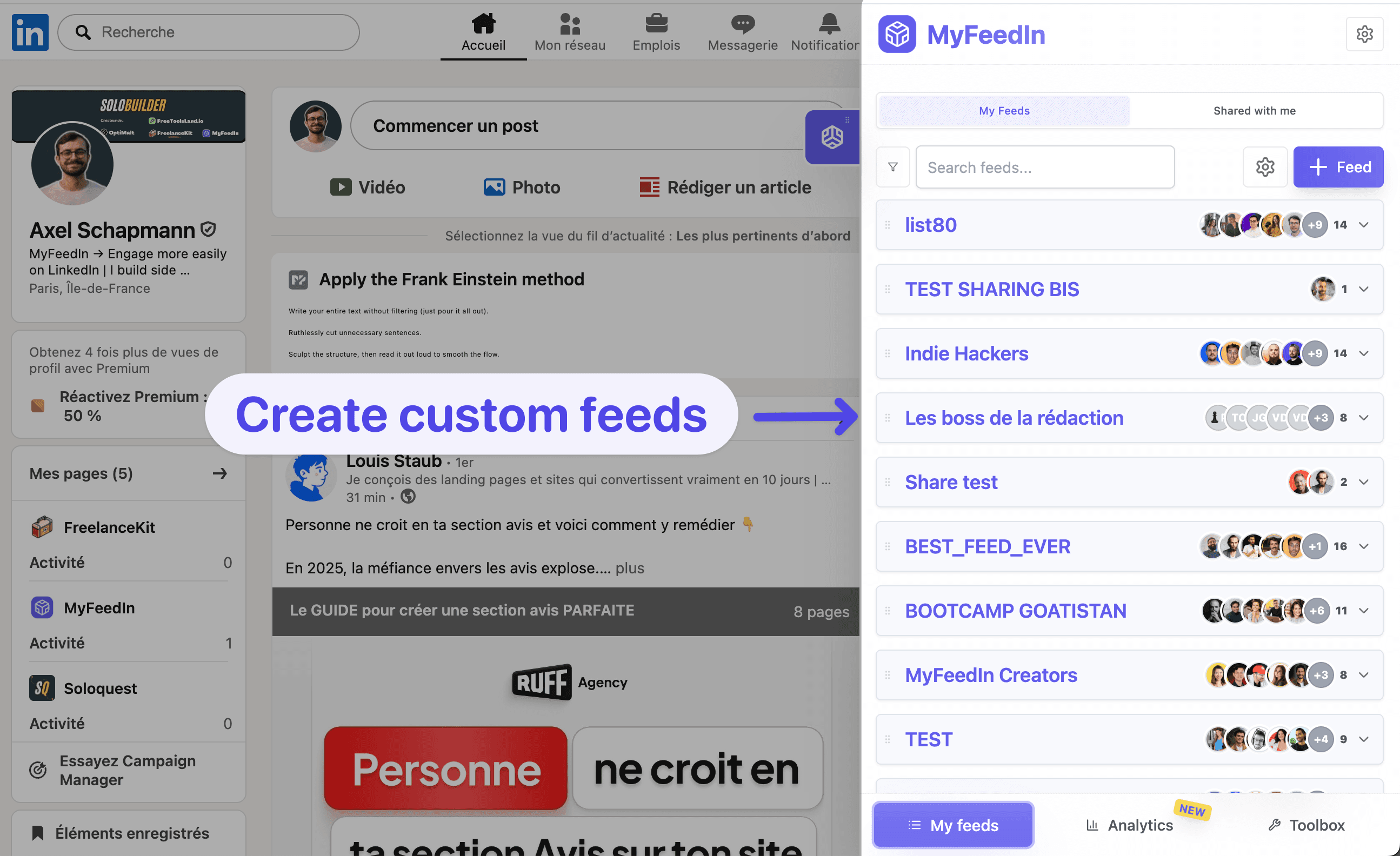
Custom Feeds
Create personalized feeds to follow the creators that matter. Stop scrolling through noise, see only what's relevant.
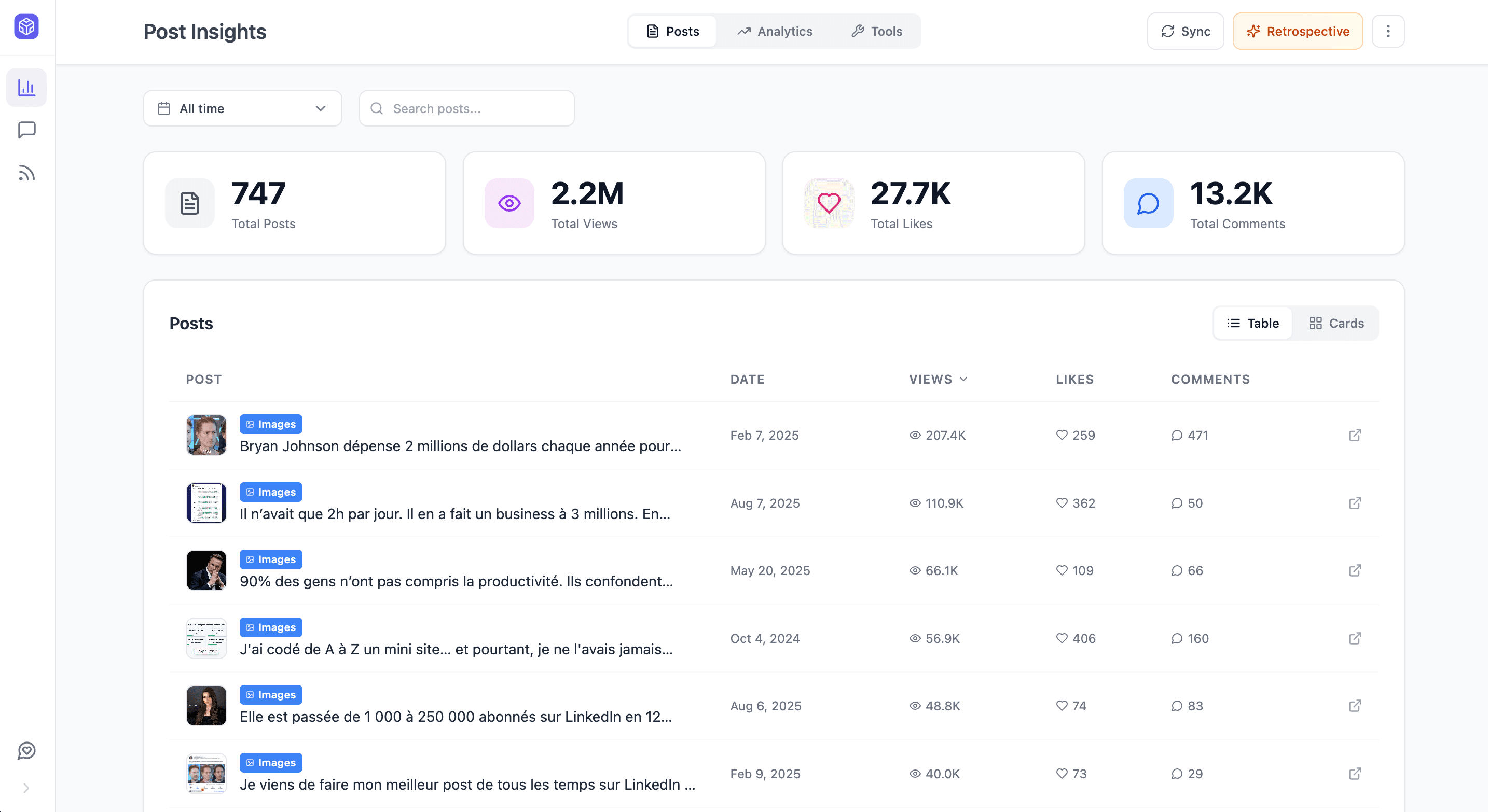
Post Insights
Get detailed analytics on any LinkedIn post. See what performs and why.
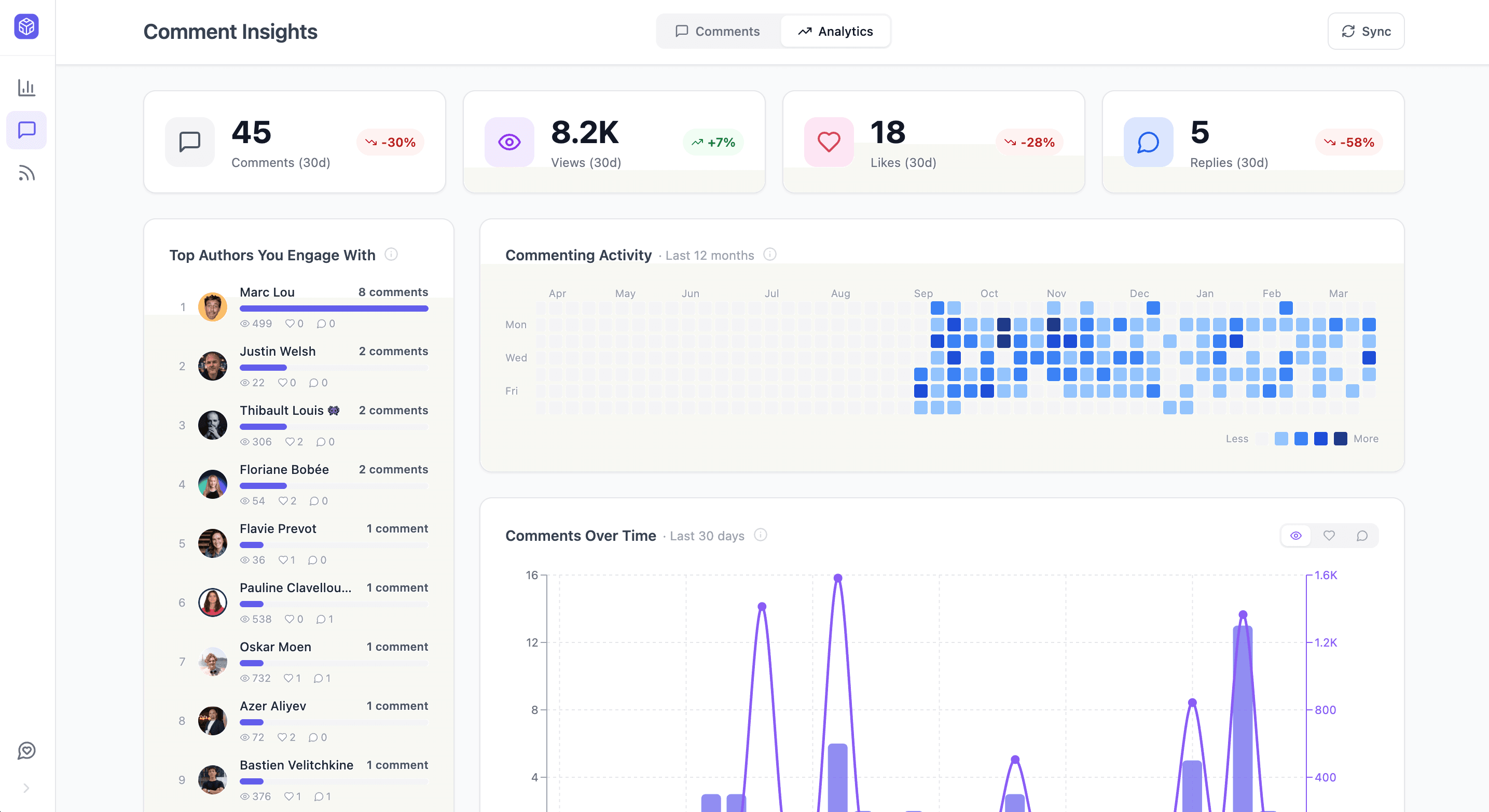
Comment Insights
Track your commenting activity and see which comments drive the most engagement.
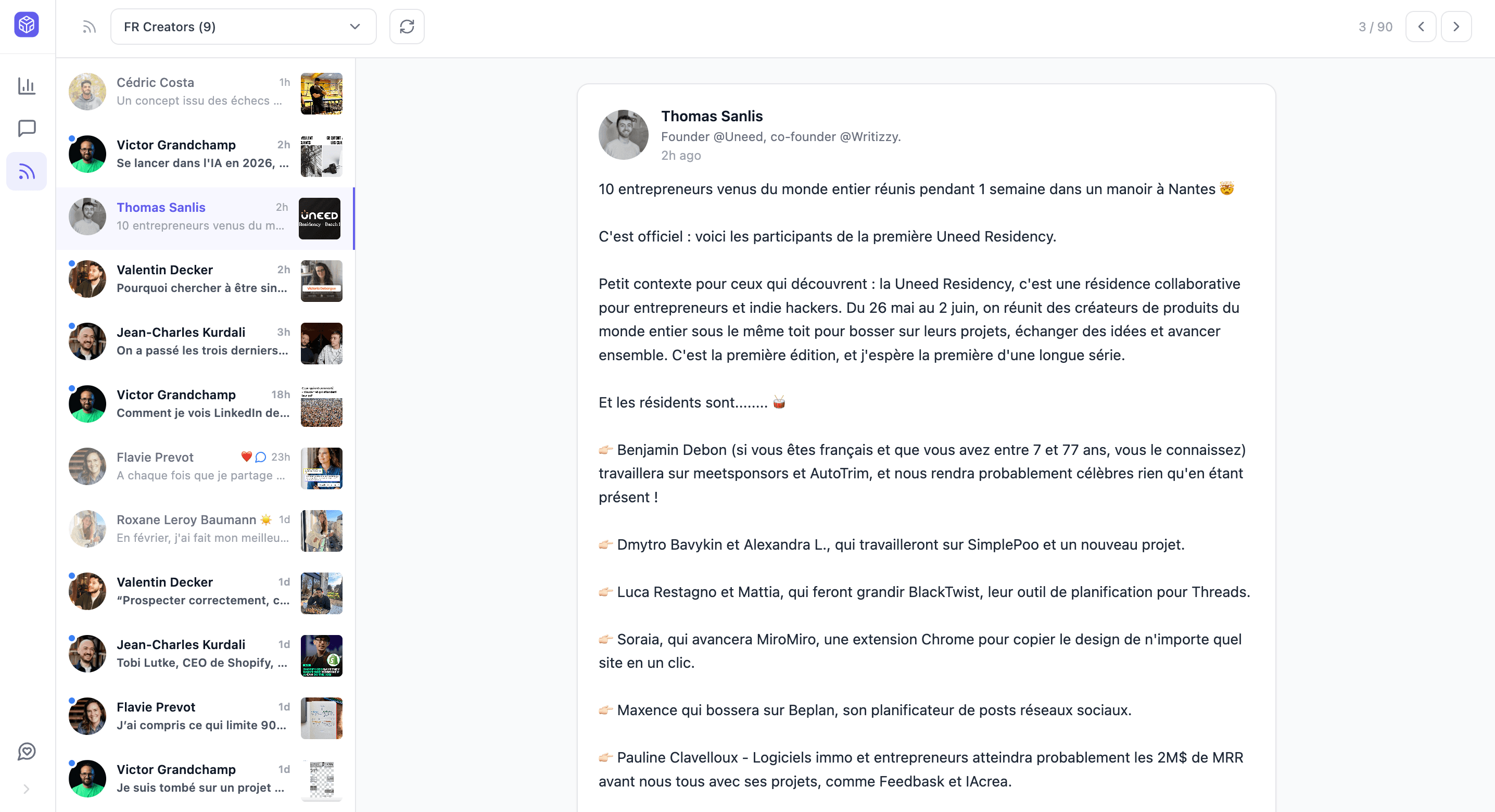
Focus Feed
Distraction-free mode that removes the noise so you can engage with intention.
Loved by LinkedIn creators
Founders, ghostwriters, and creators use MyFeedIn every day. Here is what they say.
MyFeedIn has made LinkedIn orders of magnitude more enjoyable. It's also allowed me to engage with the content that really matters, and spark worthwhile conversations. Business-wise, it's a no-brainer.
 Bastien Velitchkine
The time MyFeedIn saves me is just insane! Beyond being a tool I use every day, I recommend it because a lot of my clients have adopted it too!
 Elodie Hughes
MyFeedIn helps me having a better LinkedIn feed and avoid useless distraction. It makes it easier to engage with the right people and saves me a lot of time!
 Alexandre Grisey
Great app! I use it like a social CRM, super handy for engaging only with my dream clients!
 Maxime Lemaire
An extension that changed how I use LinkedIn! So handy, simple, and effective. A well-designed gem for saving time!
 Emmy Perez
Excellent extension that keeps improving over time with more and more helpful features!
 Ines Cointement
MyFeedIn has made LinkedIn orders of magnitude more enjoyable. It's also allowed me to engage with the content that really matters, and spark worthwhile conversations. Business-wise, it's a no-brainer.
Bastien VelitchkineThe time MyFeedIn saves me is just insane! Beyond being a tool I use every day, I recommend it because a lot of my clients have adopted it too!
Elodie HughesMyFeedIn helps me having a better LinkedIn feed and avoid useless distraction. It makes it easier to engage with the right people and saves me a lot of time!
Alexandre GriseyGreat app! I use it like a social CRM, super handy for engaging only with my dream clients!
Maxime LemaireAn extension that changed how I use LinkedIn! So handy, simple, and effective. A well-designed gem for saving time!
Emmy PerezExcellent extension that keeps improving over time with more and more helpful features!
Ines CointementTotal banger, it saves a crazy amount of time instead of scrolling endlessly on LinkedIn. And the product is clean and beautiful as a bonus.
 Camille Vingere
Super handy! I use MyFeedIn to make my LinkedIn monitoring easier and to organize my commenting strategy. Visibility matters a lot, and this helps me grow my network.
 Adeline Lory
MyFeedIn erased my LinkedIn mental load. Now I scroll smartly on my computer, and it's a completely different experience.
 Prisca Randriamihamina
A very, very useful extension that saves me time networking and helps me stay focused on my LinkedIn goals. Highly recommend!
 Mai Anh Phi
I've been using MyFeedIn intensively for 3 months. GOOOLD product, highly recommend!
 Paul-Olivier Rey
The simplest and most effective extension for building custom lists on LinkedIn. Paired with the feed blocker, it lets you focus on the profiles you're really targeting.
 Alessio Fancello
Total banger, it saves a crazy amount of time instead of scrolling endlessly on LinkedIn. And the product is clean and beautiful as a bonus.
Camille VingereSuper handy! I use MyFeedIn to make my LinkedIn monitoring easier and to organize my commenting strategy. Visibility matters a lot, and this helps me grow my network.
Adeline LoryMyFeedIn erased my LinkedIn mental load. Now I scroll smartly on my computer, and it's a completely different experience.
Prisca RandriamihaminaA very, very useful extension that saves me time networking and helps me stay focused on my LinkedIn goals. Highly recommend!
Mai Anh PhiI've been using MyFeedIn intensively for 3 months. GOOOLD product, highly recommend!
Paul-Olivier ReyThe simplest and most effective extension for building custom lists on LinkedIn. Paired with the feed blocker, it lets you focus on the profiles you're really targeting.
Alessio FancelloFrequently asked questions
Can't find the answer you're looking for? Send us a message and we'll help you out.