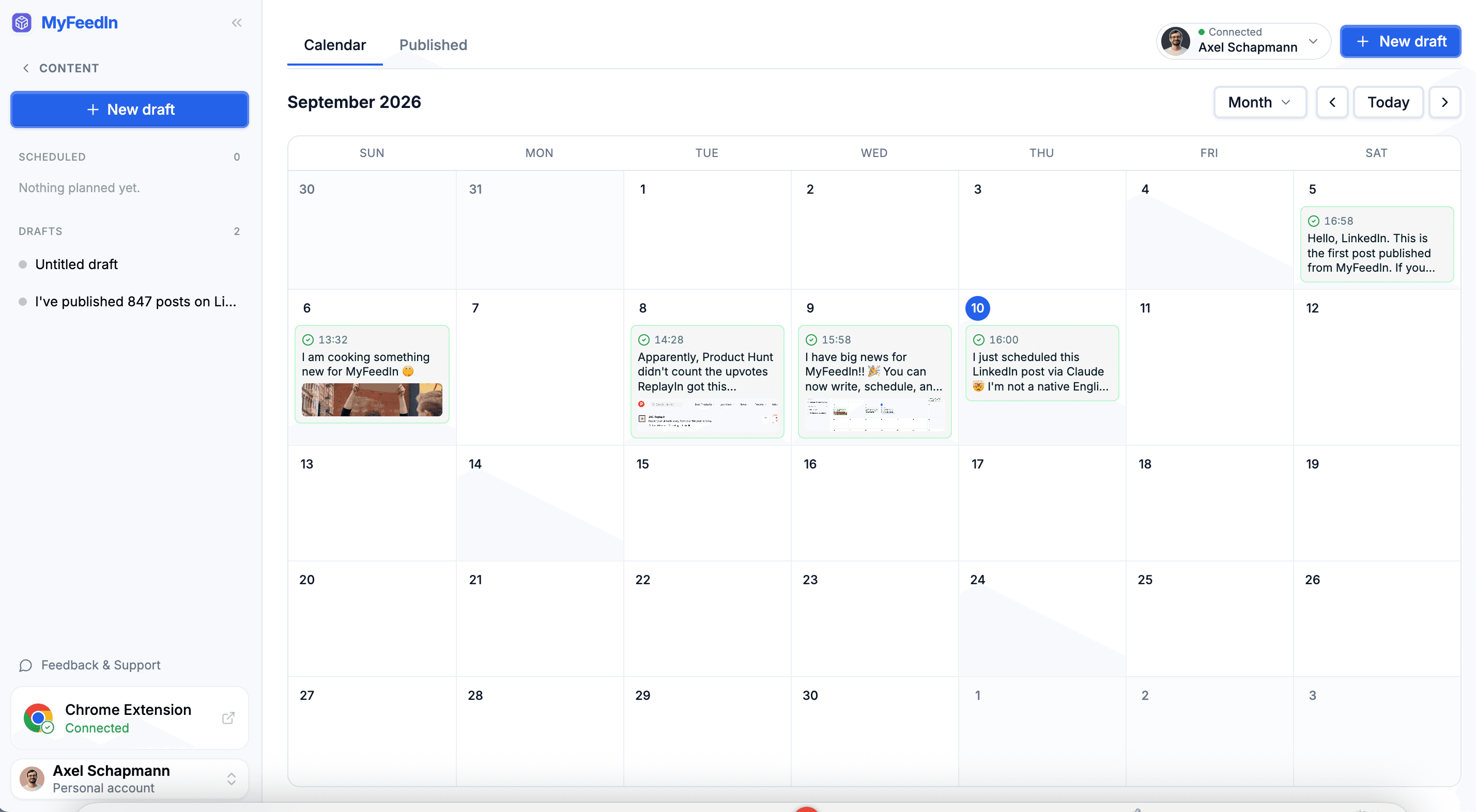
LinkedIn content calendar
The real MyFeedIn calendar, shown here with sample posts. Drag a scheduled post to another day, or click a free day to add a draft.
LinkedIn post scheduler features
Write, schedule, publish and measure your LinkedIn posts, all in one place.

Axel Schapmann
Founder of MyFeedIn
I scheduled every LinkedIn post of the month in one Sunday afternoon. Here's the exact routine, and the one slot that beat all the others.
Write your posts with images, PDFs and video
The editor shows your post as your network will see it: your name, the text, the media under it, and the first comment as a reply. Save it as a draft or put it straight on the calendar.
A post scheduled for 09:00
- 09:00Your slot on the calendar
- 09:02Published on LinkedIn, within a few minutes of the slot
- 09:04First comment posted under it
- 09:04Email: your post is live
Schedule your posts at the best time
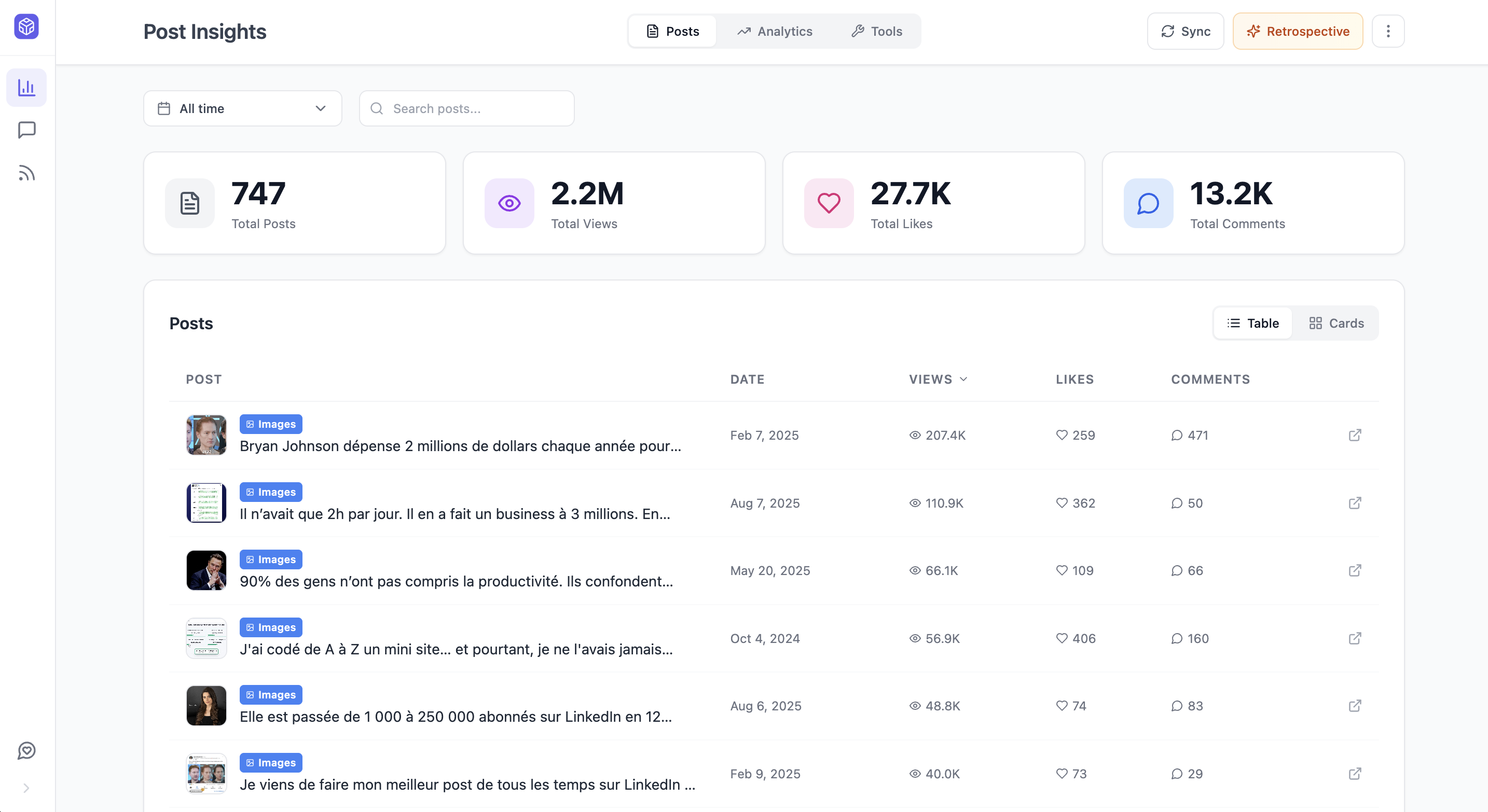
Pick a slot, or drop the post on a day, and MyFeedIn publishes it for you within minutes. Set your time zone and preferred posting slots once, and every new post lands where your audience actually is.
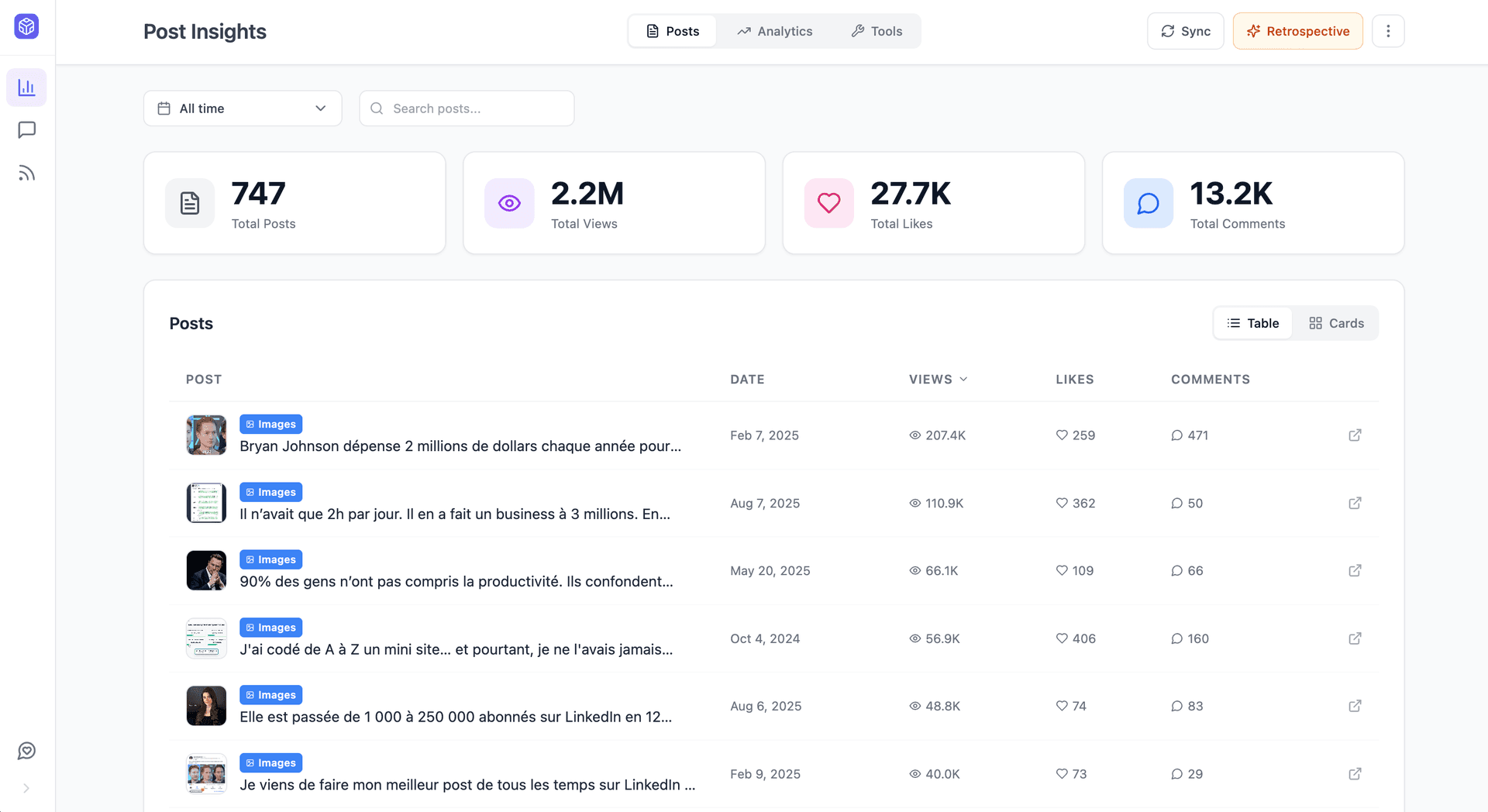
Once a post is out, it moves to the Published tab with its impressions, likes, comments and reposts as the stats come in. Your schedule stops being a guess: the slots and formats that work are right there.
Learn moreLinkedIn native scheduler vs MyFeedIn
LinkedIn's built-in scheduler is fine for one post tomorrow morning. A calendar earns its place once you plan a week at a time.
| LinkedIn's scheduler | MyFeedIn | |
|---|---|---|
| Schedule posts for later | ||
| Calendar of every planned post | ||
| Drag a post to another day | ||
| Preferred posting slots | ||
| Automatic first comment | Growth | |
| Schedule from Claude or ChatGPT | ||
| Price | Free | Included in paid plans |
LinkedIn's built-in scheduler as documented in LinkedIn Help, September 2026.
When do you need a LinkedIn post scheduler?
If you write a post and want it out tomorrow at 9am, LinkedIn's clock icon does the job for free. Our guide on how to schedule a post on LinkedIn walks through it on desktop, mobile and company Pages.
A scheduler starts paying off when LinkedIn becomes a habit: you batch a week of posts on Sunday, you want to see the whole month before it happens, you move a post when news breaks, and you want the first comment and the stats handled for you. That's exactly what MyFeedIn does, with the numbers from every post feeding the next week's plan.
Looking for the right time to post? Start with the best time to post on LinkedIn, then let your own results in the Published tab refine it.
How to schedule LinkedIn posts
Connect LinkedIn, plan your posts, and MyFeedIn publishes them for you.
Connect your LinkedIn account
Sign in with LinkedIn from Settings in a few seconds. MyFeedIn publishes through LinkedIn's official API.
Schedule your LinkedIn posts
Write your post, add images, a PDF or a video, then pick a slot or drag it onto a day of the calendar.
Auto-post to LinkedIn and track results
Your post goes live on time, and the Published tab fills in with its impressions, likes, comments and reposts.


Loved by LinkedIn creators
Founders, ghostwriters, and creators use MyFeedIn every day. Here is what they say.
 Bastien Velitchkine
MyFeedIn has made LinkedIn orders of magnitude more enjoyable. It's also allowed me to engage with the content that really matters, and spark worthwhile conversations. Business-wise, it's a no-brainer.
 Elodie Hughes
The time MyFeedIn saves me is just insane! Beyond being a tool I use every day, I recommend it because a lot of my clients have adopted it too!
 Alexandre Grisey
MyFeedIn helps me having a better LinkedIn feed and avoid useless distraction. It makes it easier to engage with the right people and saves me a lot of time!
 Maxime Lemaire
Great app! I use it like a social CRM, super handy for engaging only with my dream clients!
 Emmy Perez
An extension that changed how I use LinkedIn! So handy, simple, and effective. A well-designed gem for saving time!
 Ines Cointement
Excellent extension that keeps improving over time with more and more helpful features!
Bastien VelitchkineMyFeedIn has made LinkedIn orders of magnitude more enjoyable. It's also allowed me to engage with the content that really matters, and spark worthwhile conversations. Business-wise, it's a no-brainer.
Elodie HughesThe time MyFeedIn saves me is just insane! Beyond being a tool I use every day, I recommend it because a lot of my clients have adopted it too!
Alexandre GriseyMyFeedIn helps me having a better LinkedIn feed and avoid useless distraction. It makes it easier to engage with the right people and saves me a lot of time!
Maxime LemaireGreat app! I use it like a social CRM, super handy for engaging only with my dream clients!
Emmy PerezAn extension that changed how I use LinkedIn! So handy, simple, and effective. A well-designed gem for saving time!
Ines CointementExcellent extension that keeps improving over time with more and more helpful features!
 Camille Vingere
Total banger, it saves a crazy amount of time instead of scrolling endlessly on LinkedIn. And the product is clean and beautiful as a bonus.
 Adeline Lory
Super handy! I use MyFeedIn to make my LinkedIn monitoring easier and to organize my commenting strategy. Visibility matters a lot, and this helps me grow my network.
 Prisca Randriamihamina
MyFeedIn erased my LinkedIn mental load. Now I scroll smartly on my computer, and it's a completely different experience.
 Mai Anh Phi
A very, very useful extension that saves me time networking and helps me stay focused on my LinkedIn goals. Highly recommend!
 Paul-Olivier Rey
I've been using MyFeedIn intensively for 3 months. GOOOLD product, highly recommend!
 Alessio Fancello
The simplest and most effective extension for building custom lists on LinkedIn. Paired with the feed blocker, it lets you focus on the profiles you're really targeting.
Camille VingereTotal banger, it saves a crazy amount of time instead of scrolling endlessly on LinkedIn. And the product is clean and beautiful as a bonus.
Adeline LorySuper handy! I use MyFeedIn to make my LinkedIn monitoring easier and to organize my commenting strategy. Visibility matters a lot, and this helps me grow my network.
Prisca RandriamihaminaMyFeedIn erased my LinkedIn mental load. Now I scroll smartly on my computer, and it's a completely different experience.
Mai Anh PhiA very, very useful extension that saves me time networking and helps me stay focused on my LinkedIn goals. Highly recommend!
Paul-Olivier ReyI've been using MyFeedIn intensively for 3 months. GOOOLD product, highly recommend!
Alessio FancelloThe simplest and most effective extension for building custom lists on LinkedIn. Paired with the feed blocker, it lets you focus on the profiles you're really targeting.
Ready to save time on LinkedIn?
Try it free for 7 days, no credit card required. Cancel anytime.
Starter
*Billed 96 yearly
Solo creators building presence on LinkedIn
Your posts
- Write, schedule and publish
- Track your post and comment analytics
Your network
- Unlimited custom feeds
- Save people, take notes, build your pipeline
7-day free trial · No credit card required
Growth
*Billed 180 yearly
Founders & teams who post and prospect every week
Outreach
- 30 invitations or messages a day
- Multi-step sequences
- Steal prospects from competitors' posts
Included in the 7-day free trial
We've got something for you.
Lifetime Deal
Pay once, use forever.
- All Starter features included
- Outreach campaigns not included
Scheduling, images and PDF carousels come with every paid plan. Growth adds video posts and the automatic first comment. Drafts are free for everyone.
LinkedIn post scheduler FAQ
Can't find the answer you're looking for? Send us a message and we'll help you out.
MyFeedIn schedules and publishes posts on your personal LinkedIn profile. For a company Page, LinkedIn's built-in scheduler handles text, image and video posts for super admins and content admins, and several tools post to Pages too: we compared them in the best LinkedIn scheduling tools.
A scheduled post is distributed like any post you publish by hand. Reach comes from early engagement, so pick a slot where you can reply to comments in the first hour. Our guide on how to schedule a post on LinkedIn covers this in detail.
Yes. Connect MyFeedIn to Claude or ChatGPT, ask for a post in your voice, and your assistant saves it as a draft in your calendar and schedules it for the slot you confirm.
LinkedIn's built-in scheduler is free: click the clock icon next to Post (step by step in our scheduling guide) to schedule one post up to three months ahead. MyFeedIn adds a content calendar, the first comment and post analytics, with free drafts and scheduling included in every paid plan.