How the LinkedIn algorithm works in 2026 (and what 40,000 posts say about it)
 Axel Schapmann9 min read
On this page
How the LinkedIn algorithm works
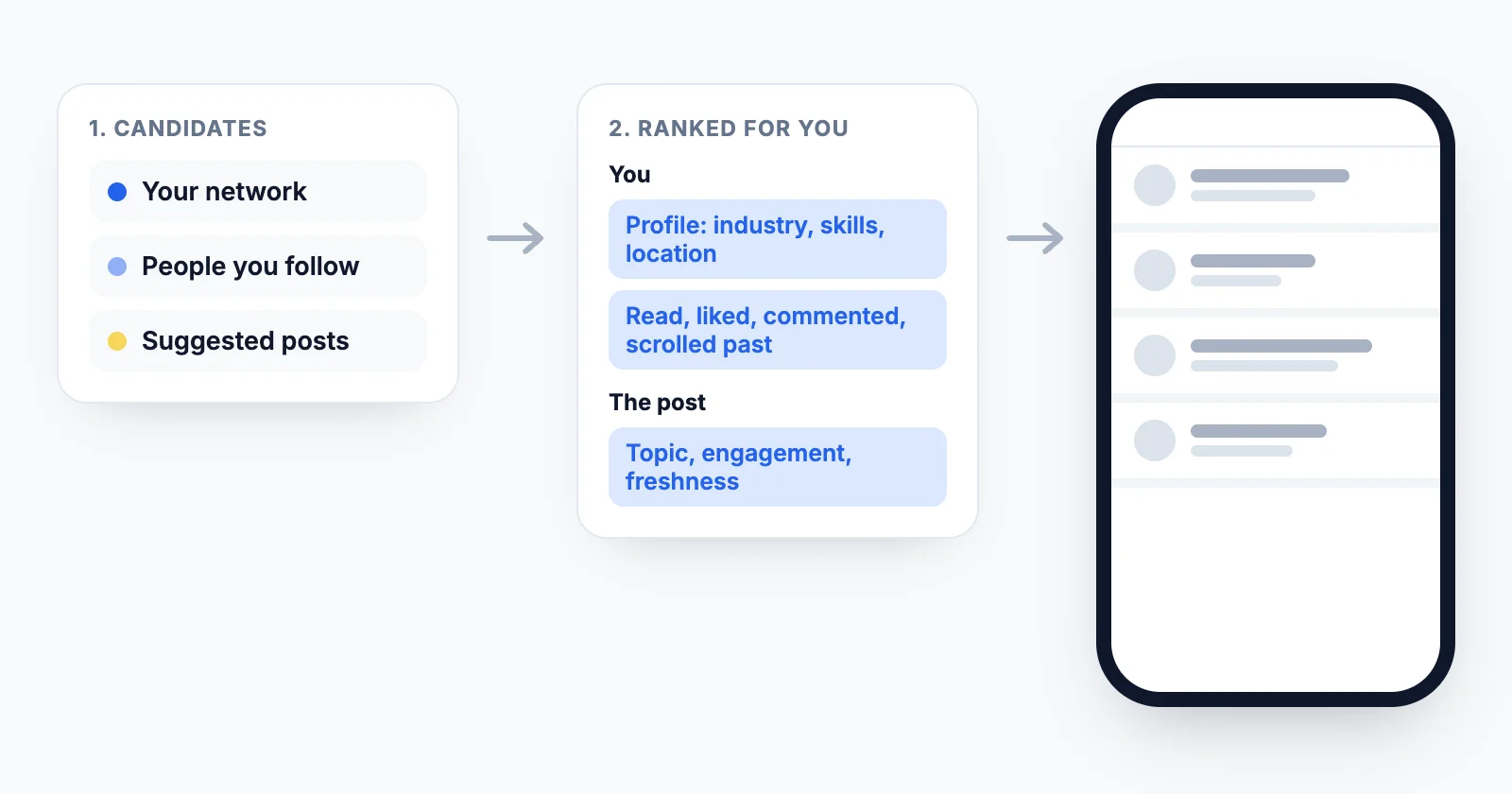
The clearest description comes from LinkedIn itself. In March 2026, its engineering team explained how the feed is built (Engineering the next generation of LinkedIn's Feed). Stripped of the technical detail, it works in two steps.
1. Find candidate posts. For each member, LinkedIn pulls posts from three places: your network, the people and Pages you follow, and suggested content from people you've never connected with. Until 2026 these came from separate systems (a chronological index of your network, trending posts in your area, posts liked by similar members). They're now one system built on a large language model that understands what a post is about, not just its keywords.
2. Rank them for you. LinkedIn then scores those posts for each member. The signals it lists:
- Your profile: industry, experience, skills and location.
- Your history: what you've read, liked, commented on, come back to, or simply scrolled past, and how that changes over time.
- The post: its topic, its engagement rate, how recent it is, and your affinity with its author.
The model "balances freshness with relevance", and a post's representation is updated as soon as it's published and again as it gains engagement. LinkedIn adds that it audits the models so that "posts from different creators compete on equal footing".
Two consequences for anyone posting:
- The same post gets a different score for every reader. There's no single "reach" number the algorithm assigns to you; it's millions of individual decisions.
- Scrolling past is a signal too. A post people consistently skip teaches the model to show it to fewer people like them.
What LinkedIn says it rewards
LinkedIn's editor in chief Dan Roth and product director Alice Xiong explained the goal in an interview with Entrepreneur:
- Knowledge and advice. "People tell us that they find it most valuable when content is grounded in knowledge and advice," Xiong said. LinkedIn evaluates whether a post shares knowledge and shows it to people it's relevant to, including outside your network.
- People you know. Members want posts "from people they know and care about", so your followers are more likely to see your posts than before.
- Not virality. "When things go viral on LinkedIn, usually that's a sign to us that we need to look into this, because that's not celebrated internally," Roth said.
For suggested posts from outside your network, LinkedIn Help adds that it first builds a pool of high-quality, professionally relevant content (not overly promotional, useful beyond the author's own network), then picks from it using each member's past interactions, including time spent on posts, their profile, and how likely they are to engage.
What changed in the LinkedIn algorithm in 2026
- An LLM-based ranking system (March 2026). The feed now understands topics semantically: someone interested in electrical engineering can be shown posts about small modular reactors because the model knows they're related, even without shared keywords. New members get relevant posts from their headline and job title alone.
- More suggested posts, for longer. LinkedIn has said it wants useful posts shown to interested readers for months, not just in the day or two after publishing (Entrepreneur).
- Hashtags matter less. A LinkedIn product manager explained in 2025 that the feed "is just doing a better job at what content is about", so hashtags mostly help people searching for a topic (Social Media Today).
- Recency keeps being tuned. In June 2025 LinkedIn tested pushing weeks-old posts up the feed, then rolled it back after complaints. Expect more tests like it.
We tested 6 LinkedIn algorithm beliefs on 40,000 posts
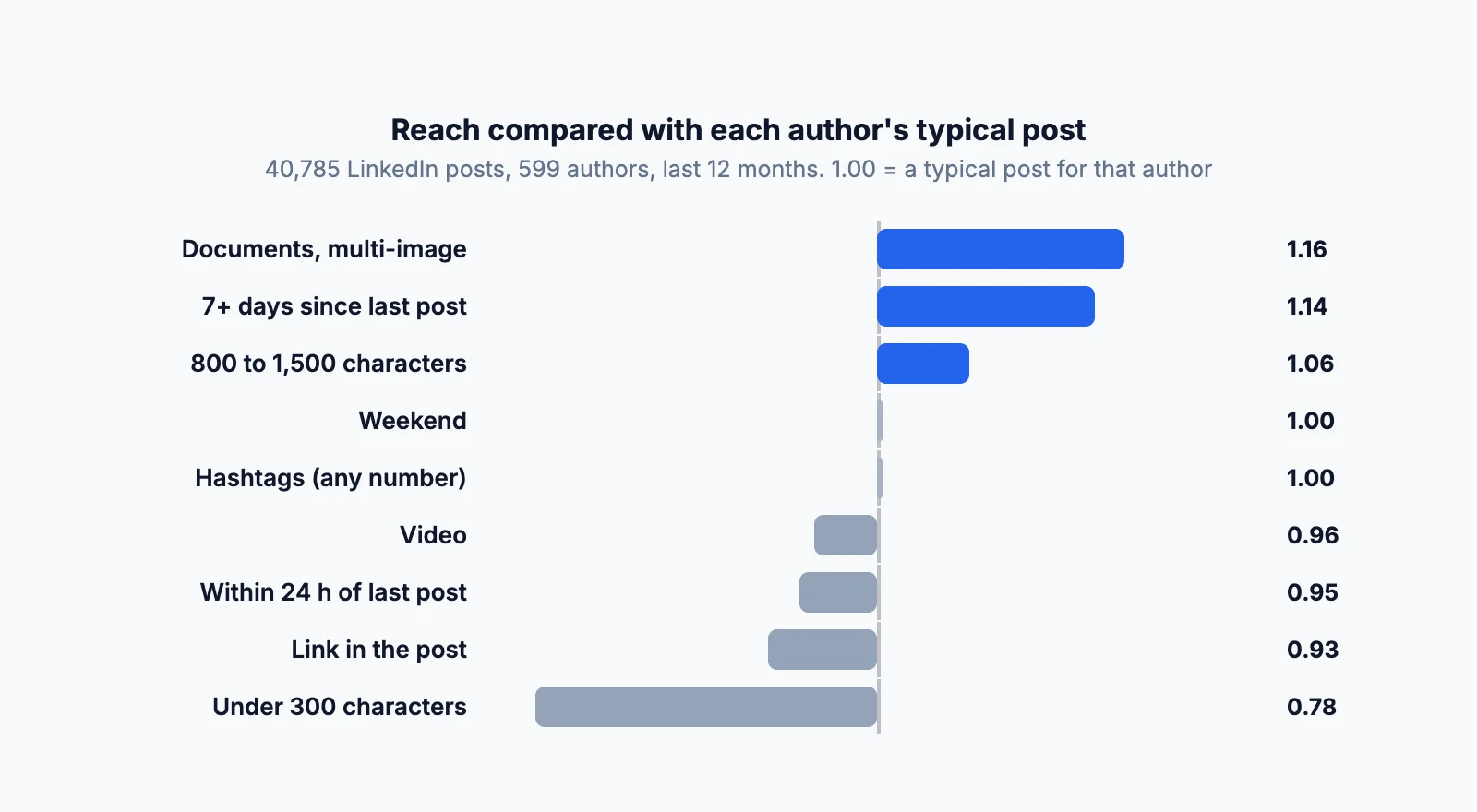
Most LinkedIn algorithm advice is repeated from one blog to the next without data. We checked six common rules on 40,785 LinkedIn posts published by 599 people over the last 12 months (September 2025 to September 2026), synced by MyFeedIn users from their own accounts, with the impressions LinkedIn reports.
How we compared: big accounts would drown out everyone else, so each post is measured against its own author's median impressions. 1.00 means a typical post for that person, 1.20 means 20% more reach than usual. We only kept people with at least 10 posts.
| Belief | What the data shows | Verdict |
|---|---|---|
| "Links in the post kill your reach" | Posts with a link: 0.93 (−7%) | A small cost, not a penalty |
| "Hashtags boost reach" | None: 1.00, 1 to 3: 0.99, 4 or more: 1.02 | No effect |
| "Short posts perform best" | Under 300 characters: 0.78 (−22%), 800 to 1,500: 1.06 | Wrong, short posts do worse |
| "Video is what the algorithm pushes" | Video: 0.96, documents and multi-image: 1.16 | Wrong, video is below average |
| "Don't post on weekends" | Weekend 1.00, weekdays 1.00 | No effect |
| "Posting every day burns your reach" | Within 24 h of your last post: 0.95, after 7+ days: 1.14 | A mild effect |
Links: about 7%, not 60%
A widely shared figure says a link cuts your reach by 60% (it traces back to a third-party blog post, not to LinkedIn). In our data the cost is 7%. LinkedIn has never published a link penalty. If a link is the point of your post, write the full idea in the text so the post is worth reading without clicking, and don't contort it into "link in the first comment" for 7%.
Hashtags: no effect either way
Posts with no hashtags, a few, or many all land at the same level. That matches what LinkedIn said about its feed understanding topics from the text. Use a hashtag if people search for it; skip them if you don't.
Length: very short posts lose
One-liners and short announcements (under 300 characters) got 22% less reach than their author's usual post. The best range was 800 to 1,500 characters, roughly 120 to 250 words, and longer posts didn't gain more. That fits the "knowledge and advice" goal: a post needs enough substance to be worth showing.
Formats: documents and multi-image posts lead
PDF carousels (documents) and posts with several images reached 16% more people than usual; single images were average; text-only and video were 4% below. Video's engagement rate was also low (1.87%, against 2.92% for images). For the full breakdown by month, see the best LinkedIn post format.
Weekends: no penalty
Weekend posts performed exactly like weekday posts. There are fewer posts competing on Saturday and Sunday, so if that's when you have time, post then. (Days are measured in UTC, so this is approximate for people far from Europe.)
Frequency: daily posting slightly dilutes each post
A post published less than 24 hours after the previous one got 5% less reach; one published after a week or more got 14% more. The effect is real but small, and part of it may be selection: people who post rarely often wait until they have something strong to say. Posting consistently still beats posting perfectly spaced.
What this data can't prove: these are correlations across real posts, not controlled experiments, and the sample is people active enough to use an analytics tool. But it's 40,000 posts rather than one creator's anecdote.
Why more reach doesn't mean the algorithm likes your post
Across the same posts, the engagement rate drops as impressions climb: about 2.5 to 2.7% for posts under 2,000 impressions, 1.7% between 2,000 and 10,000, 0.64% above 10,000. Once a post leaves your network, the algorithm shows it to people who mostly scroll past.
That's also why impressions are a weak way to judge the algorithm: they're a number only LinkedIn counts, as an estimate. Reactions and comments come with names. More on this in what LinkedIn impressions really measure.
How to work with the LinkedIn algorithm
Everything above points to the same few habits:
- Write for a specific reader. LinkedIn matches posts to people by topic and profile. A post clearly about one subject for one audience is easier to place than a general one.
- Share what you know. Lessons, numbers, how you did something. That's the "knowledge and advice" LinkedIn says it prioritizes.
- Give it room. Aim for 800 to 1,500 characters rather than a one-line update.
- Pick the format for the idea. A PDF carousel or a few images for step-by-step content, text for a story, video only when motion adds something.
- Earn the first reactions from people who know you. Your network sees your posts first; comment on their posts regularly so they know your name.
- Stop obsessing over links, hashtags and posting days. In our data they barely move reach.
If your own feed is the problem rather than your reach, the reading side of the algorithm is covered in why your LinkedIn feed is full of irrelevant posts.
Test these rules on your own posts
Averages across 40,000 posts don't tell you what works for your audience. Your last 30 posts do. MyFeedIn's LinkedIn analytics keep your full post history in one place, with impressions, engagement rate and comments per post, so you can see whether documents, shorter gaps or longer posts actually work for you. To check a single post, use the LinkedIn engagement rate calculator.
FAQ
Do hashtags help on LinkedIn in 2026?
Not for reach. In our data of 40,000 posts, posts with no hashtags, 1 to 3, or 4 and more all get the same impressions relative to their author's usual level. LinkedIn has said its feed now understands what a post is about from the text itself, so hashtags mostly help people who search for a topic.
Do links reduce reach on LinkedIn?
A little. Posts with a link in the text got about 7% fewer impressions than their author's typical post in our data, far from the 60% figure that circulates. LinkedIn hasn't published a link penalty. If the link matters, write the full idea in the post so it's worth reading without clicking.
What is the best length for a LinkedIn post?
In our data, posts between 800 and 1,500 characters did best (6% above their author's usual reach), while posts under 300 characters did 22% worse. Beyond 1,500 characters there was no further gain. LinkedIn posts can be up to 3,000 characters.
How often should you post on LinkedIn for the algorithm?
Posting again within 24 hours of your previous post went with about 5% fewer impressions, and waiting a week or more with 14% more, in our data. That's a mild effect: consistency matters more than spacing, but daily posting slightly dilutes each post.
Does posting on weekends hurt your LinkedIn reach?
No. In our data, weekend posts get exactly the same impressions as weekday posts relative to their author's usual level. Fewer people post on weekends, so there's less competition in the feed.
Does LinkedIn show my post to all my followers?
No. The default feed is ranked for each member, so your post competes with everything else in their feed and may never be shown to some followers. Members who switch their feed to Most recent see the latest posts from people they follow first, without that personalized ranking.
What changed in the LinkedIn algorithm in 2026?
In March 2026 LinkedIn described a new ranking system built on large language models. It replaces several separate sources (network activity, trending posts, similar members) with one system that understands what each post is about and matches it to members' interests and career goals, including people outside your network.